
Secure Password Management Across All Devices
Overview
PasswordBox is a free password manager designed to help users securely store, retrieve, and share login credentials and personal data across multiple devices. The software aims to eliminate the frustration of forgotten passwords by offering seamless access to saved information through encrypted storage and cross-platform synchronization. Targeted at both individual users and professionals managing multiple online accounts, PasswordBox provides a centralized solution for digital identity protection.
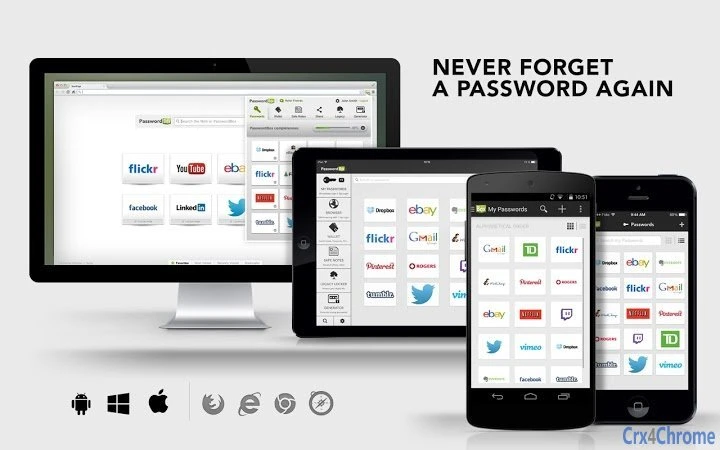
With support for Windows, Mac, iOS, and Android, the application enables consistent access to passwords and sensitive data regardless of the device being used. Real-world usage scenarios include managing personal banking logins, work email accounts, social media profiles, and subscription services. The inclusion of features like 1-Tap Login, secure password sharing, and a digital wallet suggests it is suitable for users seeking both convenience and security in their daily digital routines.
Developed by PasswordBox Inc., the software has received recognition from major tech publications, including Forbes, PC Mag, and The Wall Street Journal. These accolades highlight its reputation as a reliable and innovative tool in the crowded password management space. While specific details about the company’s background were not provided, the product’s presence in high-profile media outlets indicates a level of credibility and market validation.
Key Features & Capabilities
- 1-Tap Login: Instantly access saved accounts via a secure in-app browser or browser extension, reducing login time and minimizing errors.
- Auto-Save Logins: Automatically captures and stores new credentials while browsing, ensuring no password is missed during account creation.
- AES-256 Encryption: All stored data is protected using the highest standard of encryption, ensuring that sensitive information remains secure even if the database is compromised.
- Secure SSL Sync: Data synchronization between devices occurs over encrypted SSL connections, maintaining confidentiality during transmission.
- Password Generator: Creates strong, random passwords during account setup, reducing the risk of weak or reused credentials.
- Master Password & Pin Code Lock: Users must authenticate with a master password and optionally a pin code to access their vault, adding layers of security.
- Secure Sharing: Allows controlled sharing of login details with trusted individuals, ideal for family members or team collaboration.
- Legacy Locker: Enables users to designate trusted individuals who can access their digital accounts after their passing, supporting digital estate planning.
- Digital Wallet: Stores credit cards, ID documents, passports, loyalty cards, and addresses for one-click checkout on e-commerce platforms.
- Auto-Lock Function: Automatically locks the vault after a period of inactivity, protecting data in case of device loss or theft.
These capabilities collectively address common pain points such as password fatigue, security breaches, and the inability to recover lost credentials. The integration of a digital wallet extends functionality beyond traditional password management, positioning PasswordBox as a comprehensive digital identity tool.
User Interface, Workflow & Performance
The user interface is designed for simplicity and efficiency, with a clean layout that prioritizes accessibility. Navigation is intuitive, allowing users to quickly locate saved entries, generate passwords, or access the digital wallet. The workflow is streamlined, beginning with vault unlocking via master password or pin, followed by immediate access to all stored data.
Users can expect a responsive experience when interacting with the application, particularly during login and data retrieval tasks. The software integrates with major browsers including Chrome, Firefox, Safari, and Internet Explorer, enabling seamless autofill and 1-Tap Login functionality. While specific performance metrics such as CPU or RAM usage were not provided, the application’s lightweight size of 54.3 MB suggests efficient resource utilization.
Stability appears to be a focus, given the software’s consistent performance across multiple platforms and its presence in reputable publications. The developer did not specify resource usage details, but general software behavior patterns suggest smooth operation on modern systems. The auto-lock feature enhances security without disrupting workflow, ensuring that the vault remains protected during idle periods.
Compatibility & System Requirements
PasswordBox is compatible with Windows, Mac, iOS, and Android operating systems, making it accessible across desktop and mobile environments. The software is available in version 1.8.3, with an installation size of 54.3 MB. This size indicates a lightweight footprint, suitable for devices with moderate storage capacity.
Exact system requirements were not listed by the developer. However, the broad OS support and minimal file size suggest compatibility with most modern devices. The application supports integration with popular web browsers, enabling consistent functionality across different platforms. Platform compatibility information is limited, but the software’s cross-device synchronization implies robust backend infrastructure to support seamless data exchange.
Pros and Cons
Pros
- Free version offers core password management features
- Supports multiple platforms including desktop and mobile
- Uses AES-256 encryption for maximum data protection
- Includes unique features like Legacy Locker and Digital Wallet
- Auto-saves credentials during browsing for convenience
- Secure sharing and 1-Tap Login enhance usability
- Intuitive interface with streamlined workflow
Cons
- Advanced features require a subscription upgrade
- Exact system requirements were not specified
- Performance under heavy usage not documented
- Limited information on update frequency
- Some features may be less accessible on older devices
FAQ Section
Is PasswordBox safe to use?
Yes, PasswordBox uses AES-256 encryption and secure SSL connections to protect your data. All information is encrypted locally before syncing, ensuring only you can access your vault.
Can I use PasswordBox on multiple devices?
Yes, PasswordBox supports Windows, Mac, iOS, and Android, allowing you to access your passwords and digital wallet from any device.
Does PasswordBox require an internet connection?
While the app works offline after initial setup, an internet connection is needed for syncing data across devices and accessing cloud-based features.
How often does PasswordBox update?
Regular updates are released to improve security and functionality. The exact update schedule was not specified by the developer.
Is the free version fully functional?
The free version allows you to save up to 25 passwords. For unlimited storage and access to all features, a subscription is required.
Final Thoughts
With its award-winning reputation, robust security, and cross-platform availability, PasswordBox stands out as a reliable and feature-rich password manager. The inclusion of a digital wallet and Legacy Locker adds unique value beyond standard password storage, making it ideal for users seeking a comprehensive digital identity solution. While advanced features are locked behind a subscription, the free tier offers strong foundational tools for everyday use.
For individuals managing multiple online accounts and prioritizing both security and convenience, PasswordBox delivers a compelling experience. Its intuitive design, seamless integration, and strong encryption make it a top contender in the productivity software space.
Download PasswordBox now







